Flutter Gesture Priority That Rewrites a Button Taps Per Platform
Every mobile developer has felt the phantom tap: the button that looks clickable, animates, but never fires its callback. On iOS, the tap is swallowed by a scroll view. On Android, a parent gesture interceptor claims the event first. In Flutter, the abstraction layer that promises to unify these platforms sometimes replicates the confusion. Understanding gesture priority—how a touch event is assigned to a single listener—is essential for building cross-platform apps that feel native on both sides. This article dissects the underlying models, Flutter's Gesture Arena, and practical workarounds for the silent failures that erode user trust.
The Tap That Never Arrives
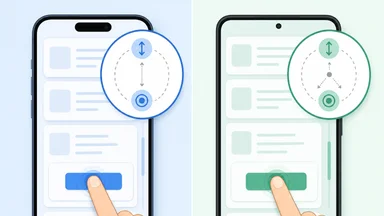
Gesture priority differences between iOS and Android are not academic. They cause real bugs that slip through QA because they only manifest under specific interaction sequences. A common example: a button inside a scrollable card list. On iOS, tapping the button works reliably because the child view receives the touch first via hit-testing. On Android, the parent scroll listener may intercept the touch before the button gets a chance, resulting in a scroll instead of a tap.
Flutter attempts to smooth over this gap with a unified gesture recognition system, but the platform-specific behaviors leak through. The framework's GestureDetector widget, for instance, registers recognizers eagerly by default. On Android, this can conflict with the platform's onInterceptTouchEvent logic, causing taps to be consumed by ancestors. Developers often describe the resulting bug as a race condition: the tap arrives, but no handler fires.
Debugging these issues requires understanding the flow of touch events on each platform and how Flutter's abstraction maps onto them. Without that knowledge, developers resort to trial-and-error workarounds—adding delays, changing hit test behaviors, or swapping widget order—without understanding why any of them work.
How iOS and Android Define Gesture Priority
iOS uses a hit-testing system that starts at the topmost view and drills down to the deepest subview under the touch point. The resulting view becomes the first responder, and touch events travel up the responder chain unless a view handles them. This means child views inherently have priority: a button inside a scroll view receives the touch first, and only if it doesn't handle it does the scroll view get a chance. The trade-off is that scroll views must delay gesture recognition briefly to wait for potential child taps—a delay that Apple tunes to feel instant but can cause subtle latency.
Android's touch event model is inverted. The system dispatches events to the top-level view first, which can intercept them via onInterceptTouchEvent before they reach child views. Parent views like ScrollView often intercept touches that look like scrolls, which can swallow taps on child buttons. The child view's onTouchEvent only fires if the parent chooses not to intercept. This design gives parents more control but places the burden on developers to explicitly disallow interception when a child should receive the tap.
Flutter's GestureDetector tries to bridge these models with an arena mechanism. Multiple recognizers compete for a gesture, and the arena declares a winner based on gesture semantics—a tap recognizer wins if the finger lifts quickly, while a horizontal drag recognizer wins if the finger moves. This works well for simple scenarios but breaks down when platform-specific behaviors like scroll view interception are involved, because the arena operates within Flutter's own widget tree, not the native event pipeline.
Flutter's Gesture Arena Under the Hood
The Gesture Arena is a finite state machine that manages the lifecycle of competing recognizers. When a pointer down event arrives, Flutter creates an arena and adds all recognizers that claim interest in that location. Each recognizer can accept, reject, or defer. If one recognizer accepts, the arena closes and the gesture is assigned to it. If all but one reject, the remaining one wins by default. If no recognizer accepts within a timeout, the arena resets.
Two widgets directly influence arena behavior: AbsorbPointer and IgnorePointer. AbsorbPointer consumes hit tests, preventing recognizers from registering in the arena. IgnorePointer simply ignores the hit test, allowing events to pass through to widgets behind. These are useful for disabling interaction without altering widget state, but they can cause confusion when used inside scrollable areas.
Platform channels introduce another layer of complexity. When Flutter delegates gesture recognition to native code—for example, in a CupertinoButton that mimics iOS button behavior—the native gesture recognizer may override the arena's decision. The CupertinoButton uses a GestureRecognizer that waits for a short delay before accepting, matching iOS's default behavior. In contrast, Material's RaisedButton uses a TapGestureRecognizer that accepts immediately. This difference becomes visible when a button sits inside a scroll view: the Material button's immediate acceptance can conflict with the scroll view's desire to intercept.
Real-World Breakage: Scroll, Swipe, and Tap
One of the most common breakage patterns involves NestedScrollView on Android. When a button is placed inside the inner scrollable area, the parent scroll view may intercept the touch before the button's tap recognizer can accept. The result is a scroll instead of a tap. On iOS, the same layout works because the hit-test gives the button priority, but the scroll view must delay its recognition—a delay that Flutter's iOS touch handler replicates, but imperfectly.
Flutter's default GestureDetector is eager: it accepts taps as soon as the pointer lifts, without waiting for potential drag gestures. This is fine for standalone buttons but problematic inside scrollable lists. The scroll view's drag recognizer may still be waiting for movement, and if the tap recognizer accepts too quickly, it steals the gesture from the scroll. Solutions include wrapping the button in a Listener that absorbs the event, or using a custom GestureRecognizer that delays acceptance by a few milliseconds.
Testing on both platforms reveals silent bugs. A tap that works on iOS might fail on Android, or vice versa, depending on the widget hierarchy and the platform's interception logic. Automated tests using Flutter's WidgetTester can simulate taps but often miss the platform-specific nuances because they run in a simulated environment. Device testing is essential, yet many teams skip it, leading to production complaints about "unresponsive" buttons.
Consider a concrete scenario: a music streaming app with a "Like" button inside a horizontal swipeable card. On iOS, the tap works reliably because the hit-test gives the button priority. On Android, the swipe gesture recognizer on the card parent may intercept the touch as a potential swipe, and if the user's finger moves even slightly, the tap is never delivered. The developer might tweak the swipe sensitivity or add a delay to the tap recognizer, but without understanding the platform difference, they might overcorrect and introduce lag on iOS.
Another example is a bottom sheet with interactive elements. On Android, the bottom sheet's drag handle often uses onInterceptTouchEvent to allow dragging, but if a button is placed near the handle, taps can be intercepted. Developers sometimes resort to wrapping the button in a GestureDetector with behavior: HitTestBehavior.opaque and a custom recognizer that rejects drags, but this adds complexity.
A third example involves a navigation drawer with a list of items. On iOS, tapping an item works consistently, but on Android, the drawer's gesture for opening might intercept taps near the edge. This is especially tricky when the drawer is partially open or when the user taps quickly. The fix often requires adjusting the drawer's drag threshold or using a GestureDetector with a longer deadline.
A Practical Pattern for Cross-Platform Taps
Building reliable cross-platform buttons requires a deliberate approach. First, prefer Flutter's built-in MaterialButton or CupertinoButton over raw GestureDetector. These widgets have platform-aware gesture recognizers that handle the common cases. For custom interactive areas, use RawGestureRecognizer with a custom deadline that delays acceptance long enough for scroll views to disambiguate. A delay of 50–100 milliseconds is often sufficient.
Second, wrap interactive widgets in a Listener during development to log pointer events. This helps identify whether the gesture is being intercepted before it reaches your handler. The Listener widget reports raw pointer events without competing in the arena, so it won't interfere. Use hitTestBehavior set to HitTestBehavior.opaque to ensure the listener receives events even if a child absorbs them.
Third, unit test gesture resolution with Flutter's GestureTester class. Create a mock arena and simulate pointer sequences to verify that your recognizer wins or loses as expected. While this doesn't catch platform-specific interception, it ensures the arena logic is correct. Finally, always test on real devices running both iOS and Android, especially for layouts involving nested scroll views or swipeable cards.
Another pattern is to use InkWell with onTap instead of GestureDetector. InkWell includes a TapGestureRecognizer that respects the platform's hit test behavior and works well with Material widgets. However, InkWell adds a splash effect, which may not be desired for all buttons. In that case, a custom GestureDetector with a TapGestureRecognizer that has a slightly longer deadline can be used.
For complex scenarios like nested scroll views, consider using NestedScrollView's physics property to fine-tune interception. Setting NeverScrollableScrollPhysics on inner scroll views can prevent unwanted interception, but this disables scrolling entirely. Alternatively, use ClampingScrollPhysics on Android to mimic iOS behavior more closely.
Trade-Offs and Counter-Arguments
Not everyone agrees that delaying tap acceptance is the right approach. Some developers argue that any added latency—even 50 milliseconds—degrades the feel of a button, especially on iOS where users expect instant feedback. They prefer to restructure the widget hierarchy to avoid conflicts altogether, such as moving buttons outside scrollable areas or using NestedScrollView with explicit physics that prevent interception. Others advocate for using platform channels to directly invoke native gesture recognizers, accepting the complexity for a more native feel.
There is also a school of thought that blames Flutter's abstraction for being too transparent. By exposing the arena mechanism, Flutter invites developers to tweak it, but the defaults are tuned for a middle ground that works on neither platform perfectly. A counter-argument is that Flutter should hide these details entirely and provide a single, opinionated gesture system that "just works" on both platforms, even if it means sacrificing some flexibility. The Flutter team has moved in this direction with widgets like InkWell and GestureDetector improvements in recent releases, but the underlying platform differences remain.
Another trade-off is performance. Adding listeners and custom recognizers increases the widget tree depth and the number of gesture arenas, which can impact frame rate on lower-end devices. For apps with many interactive elements, the overhead of per-button delays and listeners can add up. Developers must balance correctness with performance, often profiling on target devices to ensure the solution doesn't introduce jank.
Some developers argue that the best solution is to avoid complex gesture hierarchies altogether. They advocate for a flat widget tree where interactive elements are not nested inside scrollable views. For example, placing a button outside a list or using a FloatingActionButton that stays above the scroll content. This eliminates the conflict entirely but may not be feasible for all designs.
Another counter-argument is that Flutter's gesture system is actually superior to native systems because it is more predictable. The arena mechanism is deterministic, whereas native systems rely on platform-specific heuristics that can vary across OS versions. By understanding the arena, developers can achieve consistent behavior across platforms, albeit with some effort.
Why This Matters for User Trust
Missed taps erode user confidence quickly. A button that occasionally fails to respond feels broken, and users blame the app, not the platform. Flutter's promise of write-once, run-anywhere is appealing, but gesture priority is a subtle differentiator that demands platform-aware code. The framework's arena mechanism is a clever abstraction, but it cannot fully hide the differences in how iOS and Android handle touch events.
Getting gesture priority right requires understanding both platforms' models and adjusting Flutter's defaults accordingly. It is not a one-size-fits-all problem, and the trade-offs are real: delaying tap acceptance improves scroll compatibility but adds latency; using platform-specific recognizers increases code complexity but improves feel. Reasonable developers disagree on the best approach, and the answer often depends on the app's interaction design.
Flutter continues to evolve, with improvements to scroll physics and gesture disambiguation landing in each release. But the fundamental gap between iOS and Android touch models remains. Developers who ignore it risk shipping apps that feel unresponsive on one platform or the other. The craft of cross-platform development is not about writing once and forgetting—it's about understanding the differences and making deliberate choices that respect each platform's conventions while delivering a consistent experience.
In the end, the phantom tap is a symptom of a deeper challenge: abstracting away platform differences without losing the native feel. Flutter's gesture arena is a powerful tool, but it requires developers to think critically about touch event flow. By investing time in understanding gesture priority, developers can build apps that respond reliably, building trust with users on both iOS and Android.